Category: Uncategorized

How To Train Your Cell Phone and Laptop to Automatically Adjust Brightness Levels

Have you ever felt the painful burning sensation in your eyes when you have to work for longer hours on your computer screen or your cell phone?  I do, and luckily, I have found a solution for it. F.lux is a neat free tool built for Mac, Windows, iOS and Android. It controls the brightness of the screen depending on the time of the day. The display is bright in the morning and dims down at night, putting much less strain on the eyes.

The bright light emitted from cell phones or laptop screens may also interfere with sleep patterns, causing difficulty in falling asleep. F.lux helps with that as well.

Download free F.lux today and enjoy seeing better and sleeping better.

Here is the link to download: https://justgetflux.com/

Do give it a try!


How to Get Rid Of Annoying CounterFlix Ads (And Other Malwares) With A Free Anti-Malware Software

How to remove annoying counterflix ads from Windows based computer using free Anti-Malware SoftwareA couple weeks ago, the anti-virus software on my laptop expired (I use Windows OS). It happened just a few days before I was expecting a payment from a client, so I decided to wait till I get paid, and then purchase the renewal. Big mistake!

Two days after the anti-virus software expired, I had to complete an assignment. As soon as I opened up the web browser on my laptop, all sorts of weird things started to happen.

A gazillion windows popped up, some convincing me to buy faux leather purses from Alibaba.com (no offense!), while others offering me a holiday package of 5 nights 6 days in Bora Bora island, etc. etc.

After about 5 minutes of cautiously ignoring and bitterly closing these windows full of tempting offers , I finally made my way to a blank browser window.

By that time, I was fully aware that my laptop was infected with a malware. Which malware? You may ask. Well, I had yet to find that out.

I started by looking at the list of installed softwares on the control panel of my laptop. To my dismay, there was nothing unusual….at least nothing that I noticed (since I am not that tech savvy when it comes to operating systems and hardwares).

I decided to look at my web browser. I usually use Google Chrome and occasionally use Firefox.  I opened up a new window in Google Chrome and the same thing started happening. The windows started popping up like crazy.

There, I saw it. Cramped in a corner, in a small font, were the words “Ad by CounterFlix”. So THAT was the culprit!

Now, since I did not have any active anti-virus installed, I started looking for ways to remove this malware manually.

There were quite a few free tutorials online on removing Counterflix, but honestly, they were too complicated for me. The steps involved removing any suspicious programs from control panel and then manually removing files from Windows registry. Well, that’s too hi-tech for me.

In the quest of finding a simple solution, I came across this amazing free Anti-Malware software called ADWcleaner. I was able to download and use it very quickly, without any problem from the link here: http://www.download3k.com/Install-AdwCleaner.html
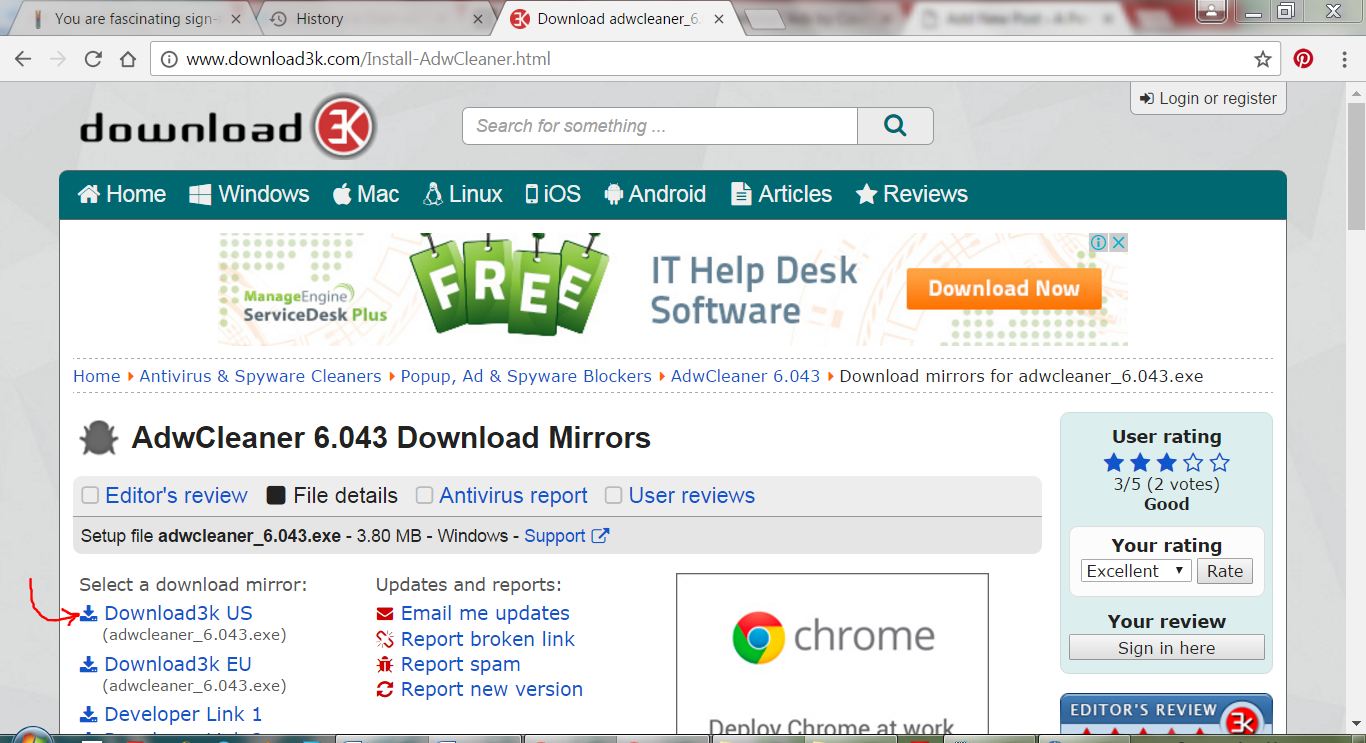
Anti-Malware Software

The software took some time to scan my laptop after I hit the Scan button, and gave me a list of about 49 suspicious files that were there on my laptop. Yikes! I was then asked if I wanted to remove these files….duh…. yeah! All I had to do was click on a button, the software did the rest. CounterFlix was a history.

I highly recommend ADWcleaner for removing malwares from Windows based computers. It is super easy to use and very effective.

Do give it a try and let me know of your experience. Best of all, it is free. Download now: http://www.download3k.com/Install-AdwCleaner.html

Thanks for stopping by. More interesting stuff coming next week. Stay tuned.

How to Identify Font (Typeface) in a PDF

How to recognise font (typeface) in a pdf document even if the font is not installed on computerThe other day, a client of mine sent me a pdf file. It was a flyer. She wanted to replicate that flyer and wanted to use the exact same font. I easily replicated the graphics and overall layout of the flyer, but finding the exact same font was a bit of challenge (at first!).

So, like everyone else, I turned to my good old friend “Google” and started looking for a solution. My first attempt in solving this “mystery” involved using some websites that claim to specialise in font recognition. Oh, how foolish I was! I tried 3 different websites. The suggested fonts from all of these 3 websites were far from what I was looking for. Not even a single alphabet matched with the font I was hoping to find. Disappointed, I resumed my research but this time I tweaked my search phrase a little bit and boom! I landed the solution right away.

Can’t believe how easy it is to recognise a font in pdf if you are using Adobe Acrobat Pro. It works even if the font is not installed on your computer!

All you have to do is select the Edit Document Text tool from your tool bar. The tool looks like this:Recognise font typeface in pdf_1If you don’t see this tool on your tool bar, here is how you get it.
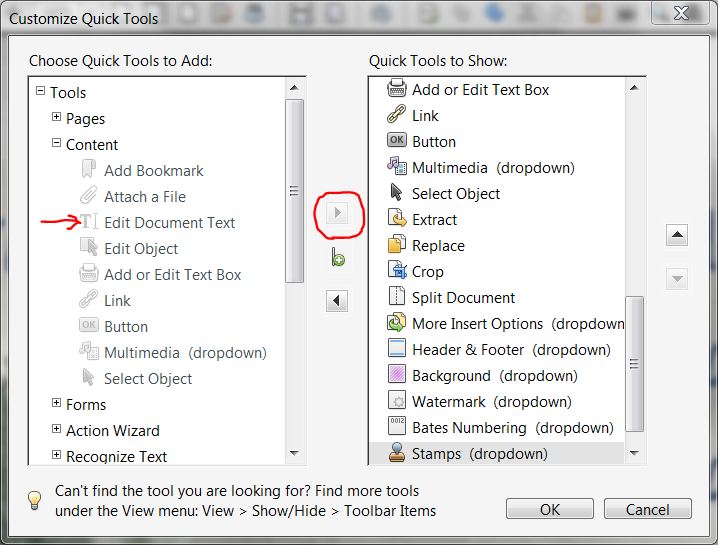
In Adobe Acrobat Pro, go to View > Show/Hide > Tool Bar Items > Quick Tools.

Recognise-font-typeface-in-pdf_2


A new window will pop up with two lists. One the left side list, expand Content. This tool will show up. Select the tool and move it to the right side list using the tiny arrow between the two lists.

Recognise-font-typeface-in-pdf_3

Then click Ok.

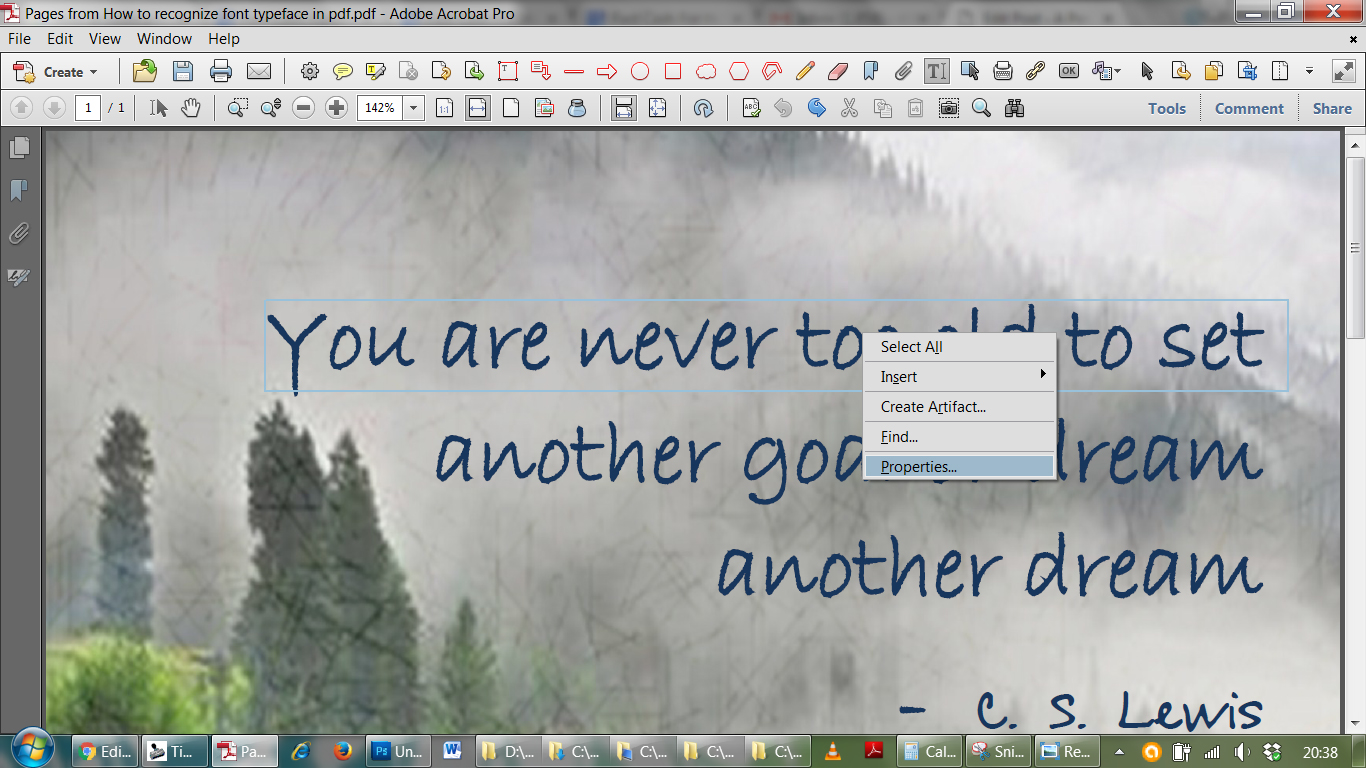
Ok now, once the tool is added to the tool bar, select the tool and right click on the text in the font you wish to recognise. Then select “Properties”.

Recognise-font-typeface-in-pdf_4

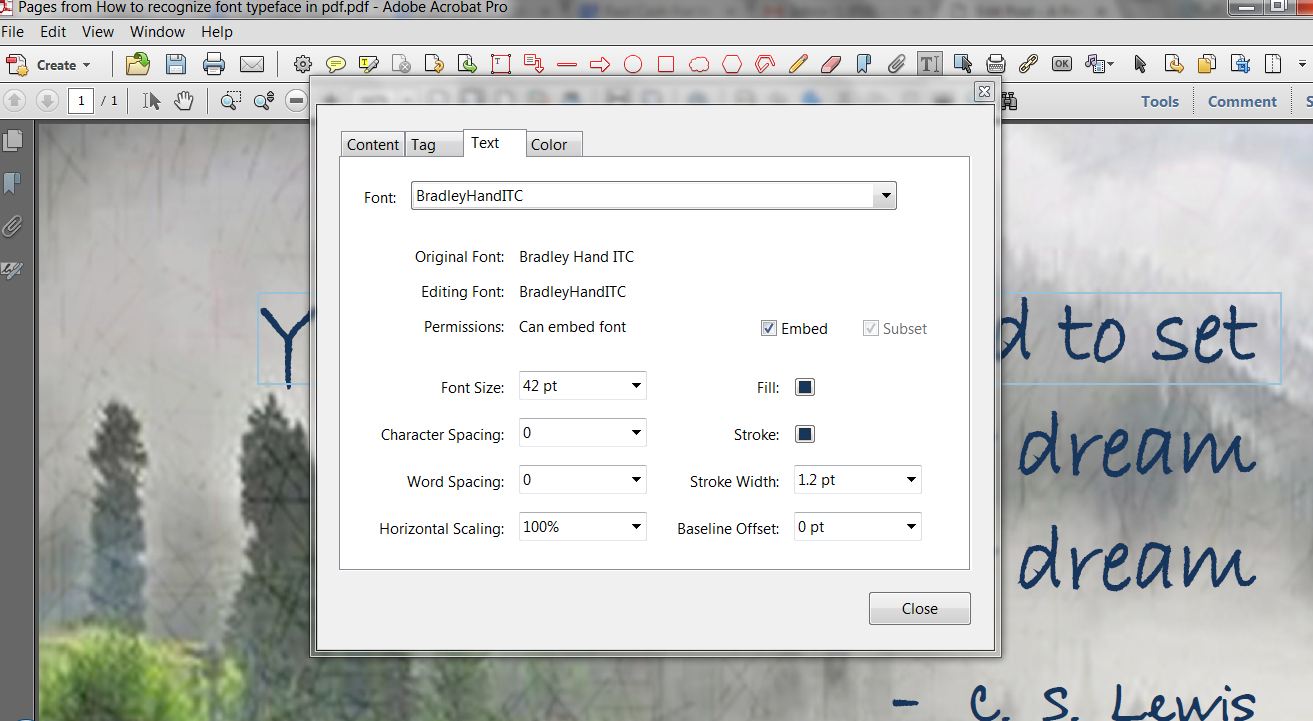
A new window will pop up. Click on the Text tab. You should not only be able to see the font type face, but also the color and size. Isn’t that amazing!

Recognise-font-typeface-in-pdf_5

It’s always fun to learn new things and share, isn’t it?. Spread the word and help others. Bye for now, until next time 🙂

Thinking Out Loud…..

Since this is my first shot at blogging, I have done (and still doing) a bit of research on what exactly a blog should be. And, from what I have learnt, ideally a blog should be a reflection of one’s thoughts and personality. So, if I am going to limit this blog to plain old boring business tips and tricks, I won’t be doing justice to this blog or myself. Because I am definitely not plain old boring (or so I think) and I like and do a lot of fun things that are anything but plain old boring. Like, for instance, I love to play with my 2.5 years old son, and like to cook (occasionally … wink wink) for my husband who is always ready to try something new. Anything craftsy excite me and I am always looking for new DIY ideas to redecorate our home. I am always interested in anything that could result in saving money. Recycling, upcycling and reusing are some of my favourite words. See!!!! I’m not boring!!!!

Then why isn’t this blog about all these fun things, you may ask! Because there are a gazillion blogs out there talking about how to save money, get craftsy and become a super mommy with a picture perfect home. And, to be honest, all these people who are running these blogs are doing a stupendous job already!

So, change of plans. This blog is not just going to be about useful business resources only, but it will also feature a little bit of this and a little bit of that to keep things interesting. I will be maintaining relevance between the posts and the actual theme of this blog, of course. Therefore, don’t be too shocked if you see a recipe here someday. It might be a recipe for busy work-at-home moms that can be cooked under 20 minutes so that they have more time for their work. Isn’t it a “useful resource”?!?!?! See…. How I am connecting the dots!!!! Hehehe 😉

Hello Everyone!

I can’t believe it! I am actually sitting down and writing my first blog post…yaaayyyy!!!!

Well, you see, I am one of those people ( hope to God there are others like me!) who always want to do something truly amazing but just get stuck in a lot of over-thinking and then that “truly amazing thing” never happens. Why? Because either I never pass across the” ifs and buts” phase or, I just get lazy or distracted (thanks to Pinterest and Facebook!!!)

So today, I told myself that I am going to write. So here I am…. Babbling my thoughts here and finally doing what I should have done ages ago!

Sometimes, it is nice to just do it without getting into all the nitty-grittys. After all, who is going to judge me? No one… duh! I know that nobody is going to read this post (or this blog! Who are we kidding!?!?!) But, this is an important step for me, and that’s what matters. This is my first step towards self-rediscovery. Now, I do not mean to imply that I feel lost or I doubt my capabilities in any way. I very well know what I am capable of doing. What I am trying to say is, there are quite a few things that I have always wanted to do but never had the time (or I should say “right time”) or right resources. So now, with this blog, I am going to give these a shot….. I hope!

Wish me luck! And if anybody (except me) is reading this, thanks for stopping by.