

Sometime back, while I was working for one of my clients, she sent me an email with an attachment. It was a printed letter that she had received in regular mail, and she had scanned it as JPG. She asked me to reproduce an exact copy of that letter so that she could edit it.
It was a long letter, and I was already in the middle of working on a project with a close deadline. So I went to see my old friend “Google” and asked for help. Google did not disappoint me… it never does!
While googling for a free resource that could help me convert that scanned image into an editable document, I came across this amazing website that converts PDF, JPG, BMP, TIFF, GIF and convert into editable formats for FREE!
Since it was only a single page, all I had to do was upload the JPG, select the language, select the output format and click on the convert button. That’s it. In less than 20 seconds, the converted document was downloaded to my computer. Other than 2 wrong spellings (the words were a bit blurry due to paper fold marks) it was perfect! Did I mention that my eyes were all watery with tears of joy!!!
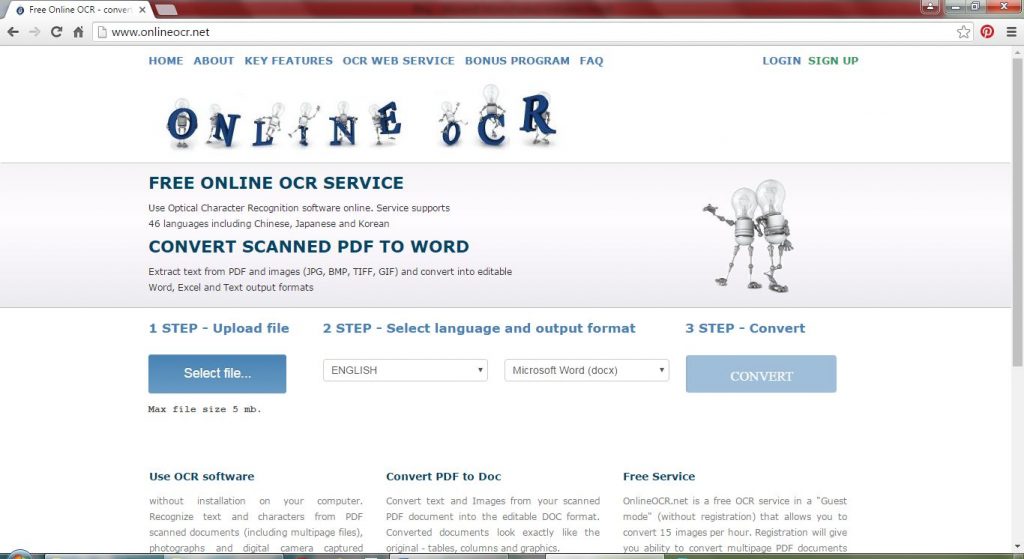
OnlineOCR is a free service. It supports 46 recognition languages. You do not have to download or install anything. All you need is an internet connection and your computer. It works beautifully on mobile devices as well. You do not have to register or share your email address. Converted documents look exactly like the original with all the tables, columns and graphics etc. As a guest visitor, OnlineOCR allows you to convert 15 images per hour and the size of the uploaded file cannot be more than 5 MB. If you decide to register (registration is free), you may convert multipage PDF documents. As a registered user, you may convert upto 25 pages and the size of the uploaded file can be up to 100 MB. If you need to convert more than 25 pages, you may purchase additional pages from OnlineOCR.net. Also, as a registered user, You can upload more than one file at once by placing the files in a ZIP archive.
Registered users may also convert only selected pages from the uploaded file. For example, if you want to convert only the first 2 pages from a 10 page PDF document, you can specify that before converting so that you only get first 2 pages converted into editable format.
I am a huge fan of OnlineOCR.net and have been using it for quite some time now. If you are looking for a fast and accurate (well almost accurate) solution for converting scanned documents into editable formats, do try OnlineOCR.net, and thank me later 😉
Here is the link: http://www.onlineocr.net/
Please share your experience in the comments below, I’d be happy to know what you think about this free resource.
